

| ⓘ “We are a Google school” This means we use Google Workspace for Education — Google’s cloud-based platform for collaboration, communication, and learning. |
Google Workspace includes tools like Google Drive, Google Classroom, Docs, Slides and more. These apps help students and teachers work together in real time from any device.
¶ Accessing Google Workspace
The easiest way to access all Google tools is through our Wallarano Launch Page: http://launch.wallarano-ps.vic.edu.au/
Staff and students sign in using their eduPass credentials. See Staff & Student Accounts for more information.
¶ Apps included in Google Workspace for Education
See below the range of online collaboration tools available as part of Google Workspace for Education.
| Name | Description |
|---|---|
| Gmail (Google Mail) | Students only: email for communication with teachers and classmates (not enabled for staff) |
| Calendar | Online calendars for scheduling events, reminders, and sharing availability |
| Meet | Video conferencing for lessons, meetings, and remote collaboration |
| Google Classroom | Virtual classrooms for teachers and students to share work, assignments, and announcements |
| Google Docs | Online word processing for creating and collaborating on documents |
| Google Sheets | Online spreadsheets for data, calculations, and collaborative work |
| Google Slides | Online presentations for lessons, class activities, and projects |
| Google Forms | Creating quizzes, surveys, and data-collection forms |
| Google Drive | Online file storage and sharing for collaboration and access across devices |
| Google Sites | Simple website creation for class pages, portfolios, and school resources |
| Google Groups | Email groups and discussion forums for teams, classes, and communication |
| Google Tasks | Personal task lists integrated with Gmail and Google Calendar |
| Google Vids | Create simple instructional or presentation videos in the browser |
| ✔ Sign in with google Some educational websites (e.g., TinkerCad, BrainPop, Sora, ClickView) allow “Sign in with Google.” This lets you log in using your school Google account instead of remembering another username and password. |
¶ Switching between Google Apps
- Sign in to any Google app (e.g., Google Drive).
- Click the Google Apps grid (the 9 dots) in the top-right corner.
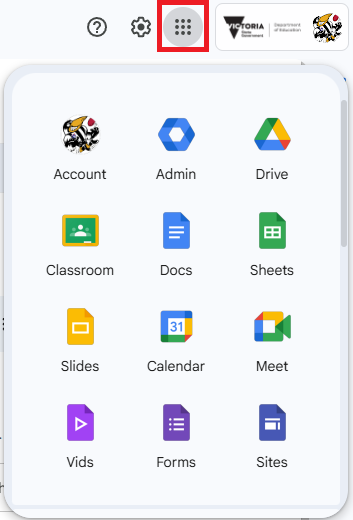
3. Select any other Google app from the list.